Video: 1920x1080, .mp4, 30 fps | Audio: AAC-LC, 163 kb/s 2 channels, 48.0 KHz | Genre: eLearning
Software: Cinema 4D & After Effects | Duration: 59 Min | Language: English | File size: 998 MB
Software: Cinema 4D & After Effects | Duration: 59 Min | Language: English | File size: 998 MB
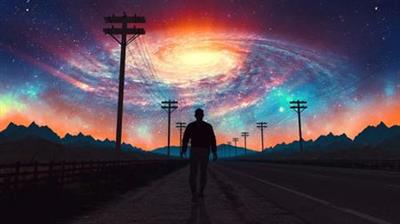
In this motion design course, instructor Nick Harauz will take you through creating a HUD landscape with the help of Cinema 4D and After Effects. We'll start off by creating a loopable rotating landscape in Cinema 4D through a non-traditional method with Volumes. We'll then export our landscape as an AEC file and then stylize inside of After Effects using a variety of Effects.
LESSON 01: CREATING THE LANDSCAPE
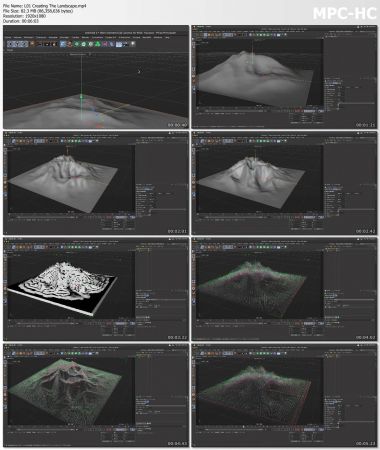
We'll set up our Cinema 4D project and create a basic landscape. We'll then take that landscape and place it inside the Volume builder to create a stylized look.
LESSON 02: CURLING THE VECTORS AND ANIMATING WITH FIELDS
In this lesson, we'll look at how we can modify our vectors as well as use fields to animate them on screen
LESSON 03: CAMERA AND NULLS
Now, we'll add an animated camera and nulls to our scene at the position of some of our vectors
LESSON 04: EXTERNAL COMPOSITING AND RENDER SETUP
We'll continue to add some external compositing tags to the null objects, so that we can see them in After Effects and then setup our render so it references the viewport
LESSON 05: VIEWPOST RENDERER AND AAC FILE
We'll look at the the viewport renderer and AAC file
LESSON 06: BRINGING IN THE AEC FILE
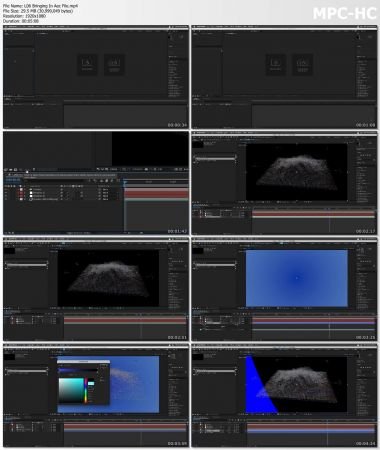
In this lesson we'll look at how we can bring in an AEC file and setup our composition in After Effects
LESSON 07: SET CHANNELS
We'll use the set channels effect on duplicate copies of the Landscape to add some distortion
LESSON 08: ADDING TEXT
In this lesson, we'll add and attach some After Effects 3D Text to one of the nulls from Cinema 4D
LESSON 09: RADIO WAVES
Now it's time to add the After Effects Radio Waves effect, adjust its properties and position it so that it's referencing the 2nd null from Cinema 4D
LESSON 10: LIGHT YOUR 3D OBJECTS
We'll add some After Effects lights to illuminate the text and Radio Waves
LESSON 11: STYLIZING THE COMP
In this last lesson, we'll add texture, color correct our piece and add some grain to the final look
Screenshots
Buy Premium Account From My Download Links And Get Resumable Support & SUPER Fastest speed
rapidgator_net:
https://rapidgator.net/file/ac949f373ca405221339611a991f3edc/yupqg.Lowepost..Hud.Landscape.in.Cinema.4D..After.Effects.part1.rar.html
https://rapidgator.net/file/7be85725548a22a74dc967a5cfe3b775/yupqg.Lowepost..Hud.Landscape.in.Cinema.4D..After.Effects.part2.rar.html
uploadgig_com:
https://uploadgig.com/file/download/fFA47a6557bb3e48/yupqg.Lowepost..Hud.Landscape.in.Cinema.4D..After.Effects.part1.rar
https://uploadgig.com/file/download/484240Cb5d181d11/yupqg.Lowepost..Hud.Landscape.in.Cinema.4D..After.Effects.part2.rar
nitroflare_com:
https://nitroflare.com/view/D90BA1CD87BE98F/yupqg.Lowepost..Hud.Landscape.in.Cinema.4D..After.Effects.part1.rar
https://nitroflare.com/view/A8A85BCE7081588/yupqg.Lowepost..Hud.Landscape.in.Cinema.4D..After.Effects.part2.rar
https://rapidgator.net/file/ac949f373ca405221339611a991f3edc/yupqg.Lowepost..Hud.Landscape.in.Cinema.4D..After.Effects.part1.rar.html
https://rapidgator.net/file/7be85725548a22a74dc967a5cfe3b775/yupqg.Lowepost..Hud.Landscape.in.Cinema.4D..After.Effects.part2.rar.html
uploadgig_com:
https://uploadgig.com/file/download/fFA47a6557bb3e48/yupqg.Lowepost..Hud.Landscape.in.Cinema.4D..After.Effects.part1.rar
https://uploadgig.com/file/download/484240Cb5d181d11/yupqg.Lowepost..Hud.Landscape.in.Cinema.4D..After.Effects.part2.rar
nitroflare_com:
https://nitroflare.com/view/D90BA1CD87BE98F/yupqg.Lowepost..Hud.Landscape.in.Cinema.4D..After.Effects.part1.rar
https://nitroflare.com/view/A8A85BCE7081588/yupqg.Lowepost..Hud.Landscape.in.Cinema.4D..After.Effects.part2.rar
Links are Interchangeable - No Password - Single Extraction
We need your support!
Make a donation to help us stay online

Bitcoin (BTC)
bc1q08g9d22cxkawsjlf8etuek2pc9n2a3hs4cdrld

Bitcoin Cash (BCH)
qqvwexzhvgauxq2apgc4j0ewvcak6hh6lsnzmvtkem

Ethereum (ETH)
0xb55513D2c91A6e3c497621644ec99e206CDaf239

Litecoin (LTC)
ltc1qt6g2trfv9tjs4qj68sqc4uf0ukvc9jpnsyt59u

USDT (ERC20)
0xb55513D2c91A6e3c497621644ec99e206CDaf239

USDT (TRC20)
TYdPNrz7v1P9riWBWZ317oBgJueheGjATm