Last updated 4/2021
MP4 | Video: h264, 1280x720 | Audio: AAC, 44.1 KHz
Language: English | Size: 1.28 GB | Duration: 1h 40m
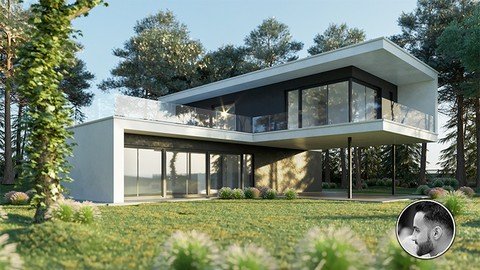
3ds Max Corona Render Photorealistic Exterior Modeling & Render
What you'll learn
be able to create realistic looking 3d visualizations in less than 2 hours
Able to create a 3d visualizations from beginning to the end
capable of modeling 3d objects with easy and, fast way Setup lighting with corona
Setup shaders for different types of material
Render out images
post process output images with photoshop
Requirements
You need 3ds max and corona and Photosop installed
You may be familiar with so simple 3Ds max basics
Working files are included, allowing you to follow along with the author throughout the lessons.
Description
• Throughout this tutorial, we will go through the complete modeling and rendering workflow for this project.We will study the different essential modeling techniques, modeling of each part of the building, including terrain modeling.A way that makes creating fast, easy to edit, and quick to render.You will also learn to brighten and render daylight scenes, as well as create your own fast rendering materials.And I will guide you through the post-production process. You will learn how to use rendering elements in Photoshop to make the picture more beautiful.At the end of this tutorial, you will be able to work and think like a professional, to model and render, and easily.Be able to finish your job in a very short time.
Overview
Section 1: Modeling whole project
Lecture 1 Import DWG File to 3Ds Max
Lecture 2 Create Walls
Lecture 3 Create Windows and Doors (Parte 01)
Lecture 4 Create Windows and Doors (Parte 02)
Lecture 5 Finishing walls
Lecture 6 Create slabs and Arranging the floor
Lecture 7 Create fenced glasse and Border
Lecture 8 Landscap
Section 2: Lighting, Camera, texturing, and add library to forest
Lecture 9 Lighting HDRi and Glass material
Lecture 10 Camera
Lecture 11 Add library to forest pack
Lecture 12 Add trees
Lecture 13 Create Materials
Lecture 14 Add plants
Lecture 15 Render Settings and Save CXR
Section 3: Post production phase by photoshop
Lecture 16 Post processing
Students who have previous simple knowledge of using 3ds max but don't know how and where to start producing 3d visualizations,This course is for beginners and advanced people who wants to learn a complete and efficient workflow within 3ds max and corona,for students who are looking for jobs with 3ds max , this course is a complete walkthrough from 0 to the Final 3d Image
Homepage
https://www.udemy.com/course/3ds-max-corona-render-exterior-visualization/Buy Premium From My Links To Get Resumable Support,Max Speed & Support Me
Fikper
knuml.3Ds.Max..Corona.Render..Creating.Private.Villa.part1.rar.html
knuml.3Ds.Max..Corona.Render..Creating.Private.Villa.part2.rar.html
Rapidgator
knuml.3Ds.Max..Corona.Render..Creating.Private.Villa.part1.rar.html
knuml.3Ds.Max..Corona.Render..Creating.Private.Villa.part2.rar.html
Uploadgig
knuml.3Ds.Max..Corona.Render..Creating.Private.Villa.part1.rar
knuml.3Ds.Max..Corona.Render..Creating.Private.Villa.part2.rar
NitroFlare
knuml.3Ds.Max..Corona.Render..Creating.Private.Villa.part1.rar
knuml.3Ds.Max..Corona.Render..Creating.Private.Villa.part2.rar
Links are Interchangeable - No Password - Single Extraction
We need your support!
Make a donation to help us stay online

Bitcoin (BTC)
bc1q08g9d22cxkawsjlf8etuek2pc9n2a3hs4cdrld

Bitcoin Cash (BCH)
qqvwexzhvgauxq2apgc4j0ewvcak6hh6lsnzmvtkem

Ethereum (ETH)
0xb55513D2c91A6e3c497621644ec99e206CDaf239

Litecoin (LTC)
ltc1qt6g2trfv9tjs4qj68sqc4uf0ukvc9jpnsyt59u

USDT (ERC20)
0xb55513D2c91A6e3c497621644ec99e206CDaf239

USDT (TRC20)
TYdPNrz7v1P9riWBWZ317oBgJueheGjATm