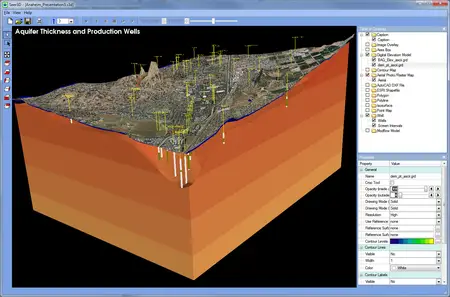
Free Download Simcore Seer3D v2.1.1 | 14.6 Mb
Seer3D is an application for the visualization of field measurement data and the groundwater model results. It includes powerful tools for displaying vector and raster maps, presenting wells, boreholes, lithological, and geophysical data. Showcase your work by merging maps, field data and model results into stunning beautiful 3D scenes! Use the intuitive display control tools to emphasize displayed objects by adjusting their transparency and display types between mesh and solid, cropping objects with on-screen crop tools, and adding annotation, logo, and legend.
Create animation videos of plume development, water level changes, flow vector field, and flow paths based on measurement data and model results. Advanced View feature enables you to store arbitrary view points and navigate between them. Present your models with eye-popping 3D stereoscoping display using Quad buffered stereo technology and deliver your Seer3D models with the free Seer3D viewer to your clients for great impression.
Numerical Models
Seer3D supports the USGS groundwater flow model MODFLOW, the transport models MT3DMS and SEAWAT, and a number of reactive transport models such as MT3D99, PHT3D, and RT3D. Seer3D can be used with most popular MODFLOW Graphical user interface applications, such as Processing Modflow, as long as they generate standard MODFLOW input datasets. The major features of the model support are outlined below:
Model Grid: Displays the model grid.
Flow Packages: Displays the model cells of the supported flow packages, such as river, drain, well, unsupported packages are ignored.
Groundwater Table: Displays the simulated groundwater table in the form of color-filled contours.
Hydraulic Head Contours: Displays simulated hydraulic heads in the form of color-filled contours on vertical or horizontal slices.
Flow Vector Field: Display flow vector fields with flow vectors attached to model cells. The magnitude and direction of flow vectors are calculated based on the effective porosity and the simulated cell-by-cell flow terms and hydraulic head values.
Flow Path: Seer3D uses a semi-analytical particle-tracking scheme to calculate streamlines or pathlines based on the calculated hydraulic head values, the calculated cell-by-cell flow terms, and the starting locations and release times of particles.
Concentration Contour: Displays simulated concentration values in the form of color-filled contours on vertical or horizontal slices.
Concentration Isosurface: Displays simulated concentration values in the form of isosurface.
Parameter Distribution: Displays spatial distribution of model parameter values, such as hydraulic conductivity, in the form of contours on vertical or horizontal slices.
Home Page-
https://www.simcore.com/wp/seer3d/Buy Premium From My Links To Get Resumable Support,Max Speed & Support Me
Links are Interchangeable - No Password - Single Extraction
We need your support!
Make a donation to help us stay online

Bitcoin (BTC)
bc1q08g9d22cxkawsjlf8etuek2pc9n2a3hs4cdrld

Bitcoin Cash (BCH)
qqvwexzhvgauxq2apgc4j0ewvcak6hh6lsnzmvtkem

Ethereum (ETH)
0xb55513D2c91A6e3c497621644ec99e206CDaf239

Litecoin (LTC)
ltc1qt6g2trfv9tjs4qj68sqc4uf0ukvc9jpnsyt59u

USDT (ERC20)
0xb55513D2c91A6e3c497621644ec99e206CDaf239

USDT (TRC20)
TYdPNrz7v1P9riWBWZ317oBgJueheGjATm