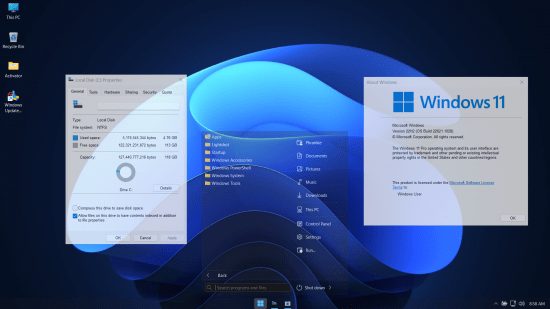
Windows 11 UltraLight 22H2 Build 22621.1028 Bypassed + Updatable + Xtreme Performance 2022
Windows x64 | English US | File Size: 2.5 GB
This is the latest version of Windows OS releases, with new interface and other new features like new Microsoft Store, a new personalized feed powered by AI and best-in-class browser performance from Microsoft Edge, Chat from Microsoft Teams integrated in the taskbar and many more!
General Info
OS Build : 22621.1028
Edition : UltraLight v2
Version : 22H2
Arch : x64amd
Lang : en-US
Author: Phrankie11
Compression: WIM Rec
ISO Size: 2.5 GB
Installed Size: 4 GB
Build Notes
- Ultimate Performance Applied
- Only 4gb Installed size
- Windows Update is working
- Defender is working
- Bloatware Free
- Support for font enable
- Keyboard English Only
- Language English
- Printing enabled
- Support for scanner present
- Microsoft Store is working
- Windows Hello present
- Bypassed All Requirements of windows 11 installation
- LZX Compression applied
- Bypassed Microsoft Account creation during setup
- Framework .Net 3.5 integrated
Removed/Disabled
- All UWP Apps excluded Microsoft Store and Windows Security
- All system apps except Windows Hello, Windows Search, Powershell and Framework .Net 3.5
- Remote Desktop
- Remote Access
- Night Light
- Backup and Restore
- Rollback
- Hyper V
- Tablet PC
- Mobile PC
- MSMQ
- Multipoint
- Diagnostic
- etc..
Pre-Installed
Framework .Net 3.5
StartAllBack
Windows Update Blocker
System Transparency
Notes
- Activator placed on desktop because windows is not activated
- If you want to use microsoft store and windows update you need to enable first the windows update blocker placed on desktop
- During first boot 2 compression will be executed just wait and relax be patient
- If you want to use printing and scanner you need to install the driver first and for printing set the print spooler automatic in services and for scanner set automatic the Windows Image Aquisition in services also
- If you want to disable transparency go to task manager and startup sectin just disable the system transparency program
PLEASE SUPPORT ME BY CLICK ONE OF MY LINKS IF YOU WANT BUYING OR EXTENDING YOUR ACCOUNT
https://nitroflare.com/view/462933E5FA1F1C1/W226211028.part1.rar
https://nitroflare.com/view/25ABC97CC40D1F2/W226211028.part2.rar
https://nitroflare.com/view/59CD6ACA5EF4EBC/W226211028.part3.rar
https://rapidgator.net/file/c46fc706b766df26ffbb7875eb4df5b9/W226211028.part1.rar.html
https://rapidgator.net/file/77b53bbb9441b5bf23d27fb2dfd4d8ff/W226211028.part2.rar.html
https://rapidgator.net/file/8d8cd073715ce25d1e85e08b813e79a8/W226211028.part3.rar.html
https://nitroflare.com/view/462933E5FA1F1C1/W226211028.part1.rar
https://nitroflare.com/view/25ABC97CC40D1F2/W226211028.part2.rar
https://nitroflare.com/view/59CD6ACA5EF4EBC/W226211028.part3.rar
https://rapidgator.net/file/c46fc706b766df26ffbb7875eb4df5b9/W226211028.part1.rar.html
https://rapidgator.net/file/77b53bbb9441b5bf23d27fb2dfd4d8ff/W226211028.part2.rar.html
https://rapidgator.net/file/8d8cd073715ce25d1e85e08b813e79a8/W226211028.part3.rar.html
We need your support!
Make a donation to help us stay online

Bitcoin (BTC)
bc1q08g9d22cxkawsjlf8etuek2pc9n2a3hs4cdrld

Bitcoin Cash (BCH)
qqvwexzhvgauxq2apgc4j0ewvcak6hh6lsnzmvtkem

Ethereum (ETH)
0xb55513D2c91A6e3c497621644ec99e206CDaf239

Litecoin (LTC)
ltc1qt6g2trfv9tjs4qj68sqc4uf0ukvc9jpnsyt59u

USDT (ERC20)
0xb55513D2c91A6e3c497621644ec99e206CDaf239

USDT (TRC20)
TYdPNrz7v1P9riWBWZ317oBgJueheGjATm