File size: 1.0 MB
In Windows, you can use Windows Firewall to block or unblock certain applications, but it doesn't offer an easy-to-use interface for its advanced features. If you want to block an application from accessing the internet, you must go through the following steps.
1. Click the Windows Start Menu and open Control Panel
2. Select System & Security
3. Then in the Firewall section, you select "Allow a program through the Windows Firewall"
4. If the program you wish to block or unblock isn't listed, you must click "Allow another program" to add it. Choose the application in the list and select "Add". Else you must then browse the hard drive to find it, and so on. This seems complicated for the average user.
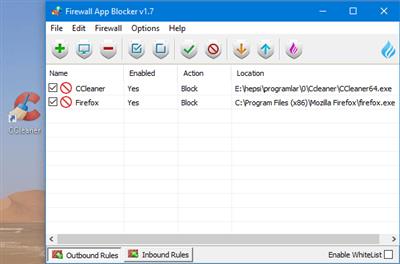
Firewall App Blocker makes the process very easy! Simply drag and drop the application you wish to block into the FAB window, or browse the hard disk to find it.That's it!
Whats New
[FIXED] – If you change GUI language, Enable WhiteList box disappears
[FIXED] – A minor bug in command prompt
[FIXED] – Entries can't be sorted that the most recently added ones are at the top
[ADDED] – Partial language support for "File -> Netsh Commands"
Homepage:
http://www.sordum.orgDownload link
rapidgator.net:
uploadgig.com:
nitroflare.com:
1dl.net:
We need your support!
Make a donation to help us stay online

Bitcoin (BTC)
bc1q08g9d22cxkawsjlf8etuek2pc9n2a3hs4cdrld

Bitcoin Cash (BCH)
qqvwexzhvgauxq2apgc4j0ewvcak6hh6lsnzmvtkem

Ethereum (ETH)
0xb55513D2c91A6e3c497621644ec99e206CDaf239

Litecoin (LTC)
ltc1qt6g2trfv9tjs4qj68sqc4uf0ukvc9jpnsyt59u

USDT (ERC20)
0xb55513D2c91A6e3c497621644ec99e206CDaf239

USDT (TRC20)
TYdPNrz7v1P9riWBWZ317oBgJueheGjATm