Siemens NX 2206 Build 5001 (NX 2206 Series) | 14.4 Gb
Product:Siemens NX Continuous Release
Version:NX 2206 Build 5001 (NX 2206 Series)
Supported Architectures:x64
Website Home Page :www.plm.automation.siemens.com
Languages Supported:multilanguage
System Requirements:Windows *
Size:14.4 Gb
Languages Supported: English, 中文, Čeština, Español, Français, Deutsch, Italiano,
日本語, 한국어, Polski, Português, Русский
The Siemens Digital Industries Software development team is pleased to announce the availability of NX 2206 Build 5001 (NX 2206 Series). With each new release of NX, we are continuing to innovate, creating the most productive modeling environment for all.
What's new in NX 2206.5000
Work area enhancements
You can now quickly add new work areas to a specific location in the plant structure, in a plant layout in Line Designer. Use the New Workarea command to create and add work area types under the selected target node only, in the Plant Navigator.
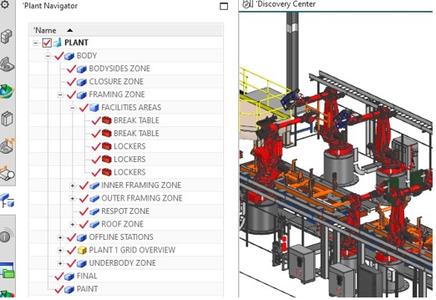
Using theNew Workareacommand, you can:
- Create a new work area under the specific target node only, that you select in a plant structure, in the Plant Navigator.
In managed NX, the list supports all types listed under the Teamcenter preference, TCAllowedChildTypes_preference. For example, TCAllowedChildTypes_MELine
In native NX, the list supports all types listed in the ugs_linedesigner_workarea_templates.pax file.
You can create the following types of work areas:
. Site
. Department
. Line
. Zone
. Workarea
. Station
- In managed NX, manually name the new work area, using alphanumeric characters.
Note: In managed NX, you must type the name of the new work area as you create it.
- In native NX, provide unique names for the new work area using the customer default Automatic Name for New Line Designer Parts.
When you open the New Workarea dialog box, you can:
. View the target node that you select in the Plant Navigator.
Note: You cannot change the target node once you open the New Workarea dialog box.
. Retain the work area that you select when you click Apply. You can create multiple new work areas under the target node, when the New Workarea dialog box is still open.
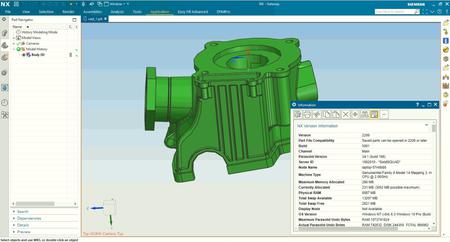
What is new in Siemens NX | Summer 2022 Launch Teaser
Join us on Tuesday 21st June at 11:00 EST (16:00 BST) for the live launch event of the Summer 2022 release of Siemens NX.
Siemens NX's continuous release strategyis what we are providing, to bring you the latest and greatest every six months. We are striving to consistently deliver value to you and enhance productivity and user experience across Siemens NX. Innovating new technology and capabilities is only part of our arsenal. We also continue to revolutionize our existing capabilities to ensure that we provide the maximum level of efficiency and ultimate user-experience for you, our customers.
Siemens is the first CAD/CAM/CAE software company to offer a continuous release model. With NX Continuous Release, upgrading is fast, automated, and seamless.
Experience NX Continuous Release
Siemens Digital Industries Softwareis a leading global provider of product life cycle management (PLM) software and services with 7 million licensed seats and 71,000 customers worldwide. Headquartered in Plano, Texas, Siemens Digital Industries Software works collaboratively with companies to deliver open solutions that help them turn more ideas into successful products.
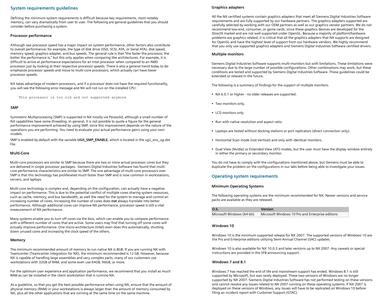
Files saved in NX-2206 Series (NX-2206 and above) cannot be opened in NX-2007 Series and lower versions of NX
NX version designation table after NX-12
NX-1847 Series: 1847-1851-1855-1859-1863-1867.xxxx
NX-1872 Series: 1872-1876-1880-1884-1888-1892.xxxx
NX-1899 Series: 1899-1903-1907-1911-1915-1919.xxxx
NX-1926 Series: 1926-1930-1934-1938-1942-1946.xxxx
NX-1953 Series: 1953-1957-1961-1965-1969-1973.xxxx
NX-1980 Series: 1980-1984-1988-1992-1996-2000.xxxx
NX-2007 Series: 2007-2008-2011-2015-2019-2023-2027.xxxx
NX-2206 Series: 2206.xxxx

Buy Premium From My Links To Get Resumable Support,Max Speed & Support Me
Download From UploadCloud
https://www.uploadcloud.pro/778vci9z9wle/wt1jz.part1.rar.html
https://www.uploadcloud.pro/ghdg33he6ss4/wt1jz.part2.rar.html
https://www.uploadcloud.pro/26rml5pszni7/wt1jz.part3.rar.html
https://www.uploadcloud.pro/tryqvpyt225s/wt1jz.part4.rar.html
Download (Uploadgig)
https://uploadgig.com/file/download/3d13e9a598dc1010/wt1jz.part1.rar
https://uploadgig.com/file/download/56630E738beebb1c/wt1jz.part2.rar
https://uploadgig.com/file/download/307D39982Ce3b8E8/wt1jz.part3.rar
https://uploadgig.com/file/download/8e087AaAc95978de/wt1jz.part4.rar
Download ( Rapidgator )
https://rapidgator.net/file/f36ceb3bc5a9037746f71edf020f0367/wt1jz.part1.rar.html
https://rapidgator.net/file/e3da9a21e0f7256d024e6d85e0d34ad3/wt1jz.part2.rar.html
https://rapidgator.net/file/e49a8089d0fe357867d0b36c97eb4b27/wt1jz.part3.rar.html
https://rapidgator.net/file/e39eb01b05a57d25acb5153bca76a8d9/wt1jz.part4.rar.html
Download ( NitroFlare )
https://nitroflare.com/view/B1E96F1452F1328/wt1jz.part1.rar
https://nitroflare.com/view/A858E1DD5097A9B/wt1jz.part2.rar
https://nitroflare.com/view/8ACFA4C52F44BAB/wt1jz.part3.rar
https://nitroflare.com/view/E080DFD0F6251F5/wt1jz.part4.rar
Links are Interchangeable - No Password - Single Extraction
We need your support!
Make a donation to help us stay online

Bitcoin (BTC)
bc1q08g9d22cxkawsjlf8etuek2pc9n2a3hs4cdrld

Bitcoin Cash (BCH)
qqvwexzhvgauxq2apgc4j0ewvcak6hh6lsnzmvtkem

Ethereum (ETH)
0xb55513D2c91A6e3c497621644ec99e206CDaf239

Litecoin (LTC)
ltc1qt6g2trfv9tjs4qj68sqc4uf0ukvc9jpnsyt59u

USDT (ERC20)
0xb55513D2c91A6e3c497621644ec99e206CDaf239

USDT (TRC20)
TYdPNrz7v1P9riWBWZ317oBgJueheGjATm