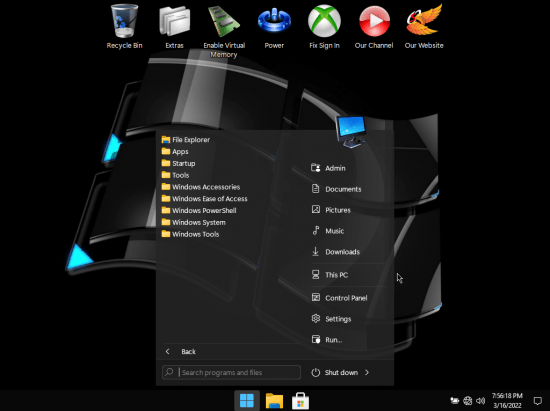
Windows 11 Pro Phoenix LiteOS Ultra Lite x64 Build 22000.588
English US | Windows x64 | 1.36 GB
Windows 11 is the latest major release of Microsoft's Windows NT operating system, released in October 2021. It is a free upgrade to its predecessor, Windows 10, available for any Windows 10 devices that meet the new Windows 11 system requirements.
General Info
Windows Edition: 11
Author: FBConan
Edition: Pro
Build: 22000.588
Architecture: x64
Format: ISO
Language: English US
File Size: 1.36 GB
Info
2.7 GB Installed Size!
Additional Language Pack Support!
MS Store, Xbox, UWP Apps Supported!
Extreme Performance for your Apps and Games!
DirectPlay and .NET Framework 3.5 Pre-Installed!
Metered Connection Set as Default for LAN / WLAN / 3G / 4G
Bypasses TPM, Secure Boot, RAM, CPU, and Storage Checks!
Includes New Virtual Memory Enabler App!
Added Advanced Power Settings!
Improved Dark Mode Theme!
Removed Features Include - Cortana, Edge, BitLocker, WSL, Hyper-V, One Drive, Defender, Windows Mail, Backup and Restore, Speech, Voice Activation, Diagnostics, Troubleshooting, Maps, Mixed Reality, Some Fonts, Optional Features.
Disabled Features Include - Error Reporting, Cumulative Updates, UAC, Ads, Telemetry, Virtual Memory, Hibernation, Power Throttling, Automatic Maintenance and Download Blocking.
How to Change System Language
• Leave Metered Connection Enabled (It is enabled by default).
• Go to Start Menu ➞ Tools ➞ and click the 'Windows Update Service On' Shortcut.
• Go to Settings App ➞ Time & Language ➞ Language & Region.
• Click the 'Add a language' Button.
• Choose a language to install from the list, Then Click 'Next'.
• Leave the 'Set as my Windows display language' box UNCHECKED, and click 'Install'.
• After installation is Complete, DO NOT Set as System Language. REBOOT PC FIRST.
• After Reboot, Go to Settings App ➞ Time & Language ➞ Language & Region, and in the 'Windows Display Language'
Setting, click the 'English (United States) Box, and change it to the Language You have Installed.
• You can then click the 'Sign Out' Button after being notified it's required to apply a new display language, and Congratulations, you are done!
Other Tips
• The Print Spooler Service, and Windows Update Service are DISABLED By Default.
• In the Start Menu ➞ Tools Folder, you can easily turn them On, or Off.
• To Install Printer Drivers, and Print, You must turn ON the Print Spooler Service.
• To Use the MS Store, Install Additional Languages, Use Xbox App, and Allow Windows to download drivers, you must turn ON the Windows Update Service.
HOMEPAGE
https://www.microsoft.com/en-pk/DOWNLOAD RAPIDGATOR
https://rapidgator.net/file/c8cdb8c1f5e7b0ebd37e2cb68d78d16c/W22000588.part1.rar.html
https://rapidgator.net/file/03a8c872bd3f9f58d70879c80f2978e6/W22000588.part2.rar.html
DOWNLOAD UPLOADGIG
https://uploadgig.com/file/download/c20F20aA450aDe91/W22000588.part1.rar
https://uploadgig.com/file/download/6e32b39666Eaf193/W22000588.part2.rar
We need your support!
Make a donation to help us stay online

Bitcoin (BTC)
bc1q08g9d22cxkawsjlf8etuek2pc9n2a3hs4cdrld

Bitcoin Cash (BCH)
qqvwexzhvgauxq2apgc4j0ewvcak6hh6lsnzmvtkem

Ethereum (ETH)
0xb55513D2c91A6e3c497621644ec99e206CDaf239

Litecoin (LTC)
ltc1qt6g2trfv9tjs4qj68sqc4uf0ukvc9jpnsyt59u

USDT (ERC20)
0xb55513D2c91A6e3c497621644ec99e206CDaf239

USDT (TRC20)
TYdPNrz7v1P9riWBWZ317oBgJueheGjATm