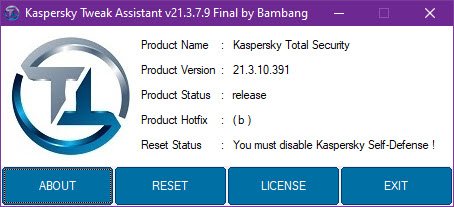
Kaspersky Tweak Assistant v21.12.26.0
File Size: 5.33 MB
Review
Kaspersky Tweak Assistant is a GUI mode tool for resetting the trial period of Kaspersky products as the other KRT_CLUB tool became PAID and more secured to bypass license checking.
Supported Kaspersky Releases:
2019:
Kaspersky Free version 19.0.0.1088 (Supports Patch A - Z);
Kaspersky Anti-Virus version 19.0.0.1088 (Supports Patch A - Z);
Kaspersky Internet Security version 19.0.0.1088 (Supports Patch A - Z);
Kaspersky Total Security version 19.0.0.1088 (Supports Patch A - Z);
Kaspersky Security Cloud version 19.0.0.1088 (Supports Patch A - Z).
2020:
Kaspersky Free version 20.0.14.1085 (Supports Patch A - Z);
Kaspersky Anti-Virus version 20.0.14.1085 (Supports Patch A - Z);
Kaspersky Internet Security version 20.0.14.1085 (Supports Patch A - Z);
Kaspersky Total Security version 20.0.14.1085 (Supports Patch A - Z);
Kaspersky Security Cloud version 20.0.14.1085 (Supports Patch A - Z);
Kaspersky Endpoint Security version 11.4.0.233 (Supports Patch A - Z).
2021:
Kaspersky Anti-Virus v21.1.15.500 + v21.2.16.590 + v21.3.10.391;
Kaspersky Internet Security v21.1.15.500 + v21.2.16.590 + v21.3.10.391;
Kaspersky Total Security v21.1.15.500 + v21.2.16.590 + v21.3.10.391;
Kaspersky Security Cloud v21.1.15.500 + v21.2.16.590 + v21.3.10.391.
Instructions for Using KTA to Perform Reset
Disable Kaspersky protection.
Disable Self-defense.
Close/exit Kaspersky from taskbar (check task manager too if Kaspersky still running or not, close from there if running there too)
Run Kaspersky Tweak Assistant tool.
Now click on the "RESET" button, it'll reset your Kaspersky application & the system should automatically restart (do manually restart if it doesn't restart automatically).
Now you're ready to use another trial period of Kaspersky.
Instructions for Using KTA to Perform License Import & Export
Disable Kaspersky protection.
Disable Self-defense.
Close/exit Kaspersky from taskbar (check task manager too if Kaspersky still running or not, close from there if running there too)
Run Kaspersky Tweak Assistant tool.
Now click on the "LICENSE" button to open "LICENSE UTILITY".
If you want to save/export license key file then click "EXPORT", the license file will be exported on the same directory where the KTA tool is located.
If you wanted to restore/import the license key file then click "IMPORT", choose the license file and your Kaspersky product will start loading with the activated added from the imported license file.
System requirements:
OS: Microsoft Windows® 7, Windows® 8, Windows® 8.1, Windows® 10 (both 32 & 64-bit).
What's New
v21.12.26.0: Issue fixed on the usage of current release but older build number. Support for KSOS File Server added.
Download link :
(If you need these, buy and download immediately before they are delete)
(If you need these, buy and download immediately before they are delete)
Links are Interchangeable - Single Extraction - Premium is support resumable
We need your support!
Make a donation to help us stay online

Bitcoin (BTC)
bc1q08g9d22cxkawsjlf8etuek2pc9n2a3hs4cdrld

Bitcoin Cash (BCH)
qqvwexzhvgauxq2apgc4j0ewvcak6hh6lsnzmvtkem

Ethereum (ETH)
0xb55513D2c91A6e3c497621644ec99e206CDaf239

Litecoin (LTC)
ltc1qt6g2trfv9tjs4qj68sqc4uf0ukvc9jpnsyt59u

USDT (ERC20)
0xb55513D2c91A6e3c497621644ec99e206CDaf239

USDT (TRC20)
TYdPNrz7v1P9riWBWZ317oBgJueheGjATm