Airfoil 5.10.6 macOS
34 MB
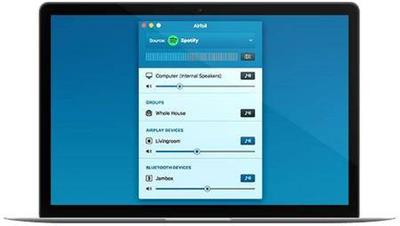
Stream any audio from your Mac all around your network. Send music services like Spotify or web-based audio like Pandora wirelessly to all sorts of devices, including the Apple TV, Google Chromecast, and Bluetooth speakers. You can even send to iOS devices and other computers. Any audio on your Mac can now be heard throughout your house!
Bluetooth Devices - Airfoil now works with the thousands of different Bluetooth speakers, headphones, and headsets available. With Airfoil 5, you can stream a single application's audio to a Bluetooth device (or even multiple Bluetooth devices!), and keep the rest of your audio on your Mac.
Airfoil Satellite - Airfoil for Mac 5.0 includes full compatibility with the new Airfoil Satellite applications, available for iOS, Mac and Windows. If you want to hear your Mac's audio on another Mac, Windows machine, or iOS device, just run the free Airfoil Satellite there. Airfoil will see it and enable you to send audio to it! Airfoil Satellite also offers remote control of both supported source applications, as well as Airfoil itself. Now you can control playback, toggle outputs off and on, and much more, all remotely.
Speaker Groups - A group is a collection of multiple speakers which appears as one in Airfoil's main window. Use a Group to send audio to multiple outputs with a single click. Create one group for all the speakers in your house, or divide your speakers into zones. Now you can send audio exactly where you want even faster.
Silence Monitor - Great for workplace or shared home setups, the new silence monitor allows Airfoil to automatically disconnect itself when it's streaming silence. The output device is then be freed up for others to use.
Custom Equalizer Presets - Adjust the equalizer to your liking, then save it in the Preset menu. Now you'll be able to access those exact settings any time you like.
Hide Speakers - If you regularly connect to a shared network which contains devices you don't control, you may wish to hide them entirely from Airfoil. Now you can do so, from the "Advanced Speaker Options" window.
Adjust Sync - Airfoil automatically keeps all outputs completely in sync. However, there may be rare situations where you wish to adjust this, such as when an output is connected to a receiver which adds its own latency. The new Sync sliders in the "Advanced Speaker Options" window make this possible.
Beautifully Refined Interface - Airfoil for Mac and Airfoil Satellite for Mac have both been improved, all without changing too much. The interface will still be familiar to users of older versions of Airfoil, but it also features many improvements. There are improvements like longer volume sliders in Airfoil's main window, as well as beautiful new graphics that are fully updated for Retina displays. Meanwhile Airfoil Satellite has been updated to include the new controls for controlling Airfoil, while retaining all that the previous "Airfoil Speakers" application offered.
It's now possible to clear Recent Applications from the Airfoil Source selector, which will make a small group of users happy.
Many other small improvements and fixes have been made.
Requires OS X 10.9 or later
Download link :
(If you need these, buy and download immediately before they are delete)
(If you need these, buy and download immediately before they are delete)
Rapidgator.net:
https://rapidgator.net/file/3bc813ad186951e86d51c18a85e0833f/20hyz.Airfoil.5.10.6.macOS.rar.html
Nitroflare.com (Fast Speed):
https://nitroflare.com/view/F660170FCF3E2CB/20hyz.Airfoil.5.10.6.macOS.rar
https://rapidgator.net/file/3bc813ad186951e86d51c18a85e0833f/20hyz.Airfoil.5.10.6.macOS.rar.html
Nitroflare.com (Fast Speed):
https://nitroflare.com/view/F660170FCF3E2CB/20hyz.Airfoil.5.10.6.macOS.rar
Links are Interchangeable - Single Extraction - Premium is support resumable
We need your support!
Make a donation to help us stay online

Bitcoin (BTC)
bc1q08g9d22cxkawsjlf8etuek2pc9n2a3hs4cdrld

Bitcoin Cash (BCH)
qqvwexzhvgauxq2apgc4j0ewvcak6hh6lsnzmvtkem

Ethereum (ETH)
0xb55513D2c91A6e3c497621644ec99e206CDaf239

Litecoin (LTC)
ltc1qt6g2trfv9tjs4qj68sqc4uf0ukvc9jpnsyt59u

USDT (ERC20)
0xb55513D2c91A6e3c497621644ec99e206CDaf239

USDT (TRC20)
TYdPNrz7v1P9riWBWZ317oBgJueheGjATm