Bzzt! Image Editor Pro v1.3.0 Multilingual
File size: 22.4 MB
Bzzt! Image Editor can compress, rotate, resize and convert images in bulk from an easy drag-and-drop interface. It's perfect for making web-friendly images in an instant. A simple graphic processing tool for resizing, converting, and compressing collections of images in batch mode, all with just a few clicks.
Process individual images or entire picture folders
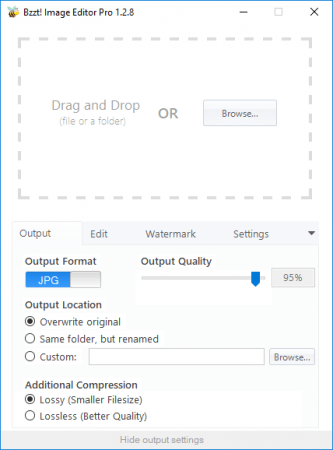
The interface consists of a large box that allows you to drag and drop either individual graphic files or entire folders that contain images in the supported input formats, namely PNG, JPG and JPEG, BMP, and GIF. As you can notice, Bzzt! Image Editor is compatible with the most widely used graphic file types. However, it does not provide support for raw images or other types of graphic files.
Simple configuration of the output
Aside from the main window, there are no additional menus to go through. The output settings are hidden by default and, although not many in number, are configurable to give you a sense of control of the resulting images. First of all, you can change the output format by switching between PNG and JPG. Secondly, the picture quality is adjustable for JPG containers. You can also use Bzzt! Image Editor to resize your images by defining a specific width and height. Last but not least, the output location can be set. If the output folder is the same, you can configure the application to either overwrite the original file or save the output with a different name.
Watermark Tool (Only in Pro)
Apply your image watermark to entire folders full of photos at once. Customize watermark location, repetition, and opacity.
Resize, compress and convert images in an instant
No one can argue that Bzzt! Image Editor is simple to use and gets the job done in a fair amount of time. Nevertheless, it is far from being a full-featured editor that can help you enhance the quality of photo collections. While it packs basic resizing and compressing tools, it lacks the advanced features you might be looking for in a reliable photo editor.
Bzzt! Image Editor Pro Features:
Drag & Drop UI
Bulk Image Processing
Resize & Rotate
Image Format Conversion
Compression & Optimization
Image Watermarking
RELEASE NOTES:
This release introduces a basic batch image renaming feature that we'll be expanding upon in future versions:
You can now apply custom file renaming rules (Settings -> File Rename Pattern)
Added support for JPEG XL files.
Fixed a bug causing stretched images when extent is used at the same time as resize.
Added Italian translation
Updated Greek, French, and Russian translations
Custom output paths will now be remembered between uses.
System Requirements:
Windows 10 32/64 bit
Windows 8 32/64 bit
Windows 7 32/64 bit
Download link :
(If you need these, buy and download immediately before they are delete)
(If you need these, buy and download immediately before they are delete)
Links are Interchangeable - Single Extraction - Premium is support resumable
We need your support!
Make a donation to help us stay online

Bitcoin (BTC)
bc1q08g9d22cxkawsjlf8etuek2pc9n2a3hs4cdrld

Bitcoin Cash (BCH)
qqvwexzhvgauxq2apgc4j0ewvcak6hh6lsnzmvtkem

Ethereum (ETH)
0xb55513D2c91A6e3c497621644ec99e206CDaf239

Litecoin (LTC)
ltc1qt6g2trfv9tjs4qj68sqc4uf0ukvc9jpnsyt59u

USDT (ERC20)
0xb55513D2c91A6e3c497621644ec99e206CDaf239

USDT (TRC20)
TYdPNrz7v1P9riWBWZ317oBgJueheGjATm