Screenshot Pro - Auto trimming v5.1.2
Requirements: Android 8.0+ | Size: 7.44 MB
High-speed screenshot photography, optimal for consecutive captures. Can cut the status bar area and navigation bar area automatically.
Features
- Cut the status bar area
Automatically cut the status bar area.
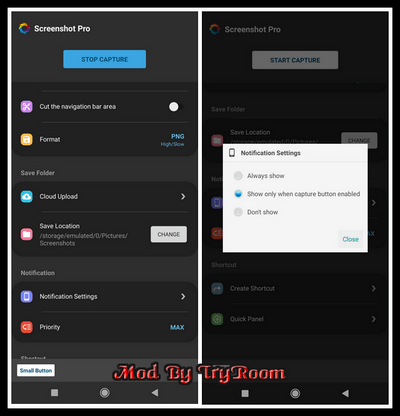
- Cut the navigation bar area
Automatically cut the navigation bar area.
- Capture animation
Capture animation ON/OFF.
- Overlay shutter button
Convenient and mobile overlay shutter button.
- Notification Icon
Notification bar icon display function. You can take screenshot and check screenshot from here.
- Show Preview
After taking a screenshot, a miniaturized version is displayed on screen.
- Small Button
By setting this inconspicuous button to be displayed at all times, the shutter button can be instantly brought up any time you want to take screenshots.
This function is very convenient for people who regularly take screenshots.
- Create Shortcut
You can also create a shortcut to access the shutter button with a single tap.
- Save Location
Modifiable save folder.
- Cloud upload
Automatically upload a copy of new screenshot to the cloud.
- Latest Screenshot
Open the most recent screenshot
HOMEPAGE
https://play.google.com/store/apps/details?id=jp.snowlife01.android.screenshot DOWNLOAD
We need your support!
Make a donation to help us stay online

Bitcoin (BTC)
bc1q08g9d22cxkawsjlf8etuek2pc9n2a3hs4cdrld

Bitcoin Cash (BCH)
qqvwexzhvgauxq2apgc4j0ewvcak6hh6lsnzmvtkem

Ethereum (ETH)
0xb55513D2c91A6e3c497621644ec99e206CDaf239

Litecoin (LTC)
ltc1qt6g2trfv9tjs4qj68sqc4uf0ukvc9jpnsyt59u

USDT (ERC20)
0xb55513D2c91A6e3c497621644ec99e206CDaf239

USDT (TRC20)
TYdPNrz7v1P9riWBWZ317oBgJueheGjATm